 GenPixy
How to Make a Whiteboard Animation for Free, Without a Watermark
Type a topic, choose Whiteboard, and tick No watermark. Here is how to get a clean, narrated whiteboard video for free every day.
3 min de leitura
Esta página ainda não foi traduzida, por isso aparece em inglês.
To make a whiteboard animation for free without a watermark in GenPixy AI, enter a topic, select Whiteboard, tick No watermark, and click Create video. You get one clean export every day, with narration and captions over a hand-drawn look, and you need no drawing skills or microphone.
Plan around that one clean export. The other free videos that day carry the mark, so test the topic with them first.
Test the idea on a regular free video first
A free account makes 3 videos a day, up to 60 seconds each at 720p. Only one of them can skip the watermark, so treat the rest as drafts: make a version with the mark, watch it, and fix the topic or the length. When you like the result, make it again with No watermark ticked. Videos made without the box ticked show a small GenPixy logo; the clean export does not.
Making the video in DrawGen
- Sign up and open DrawGen. Create a free account. No credit card is needed.
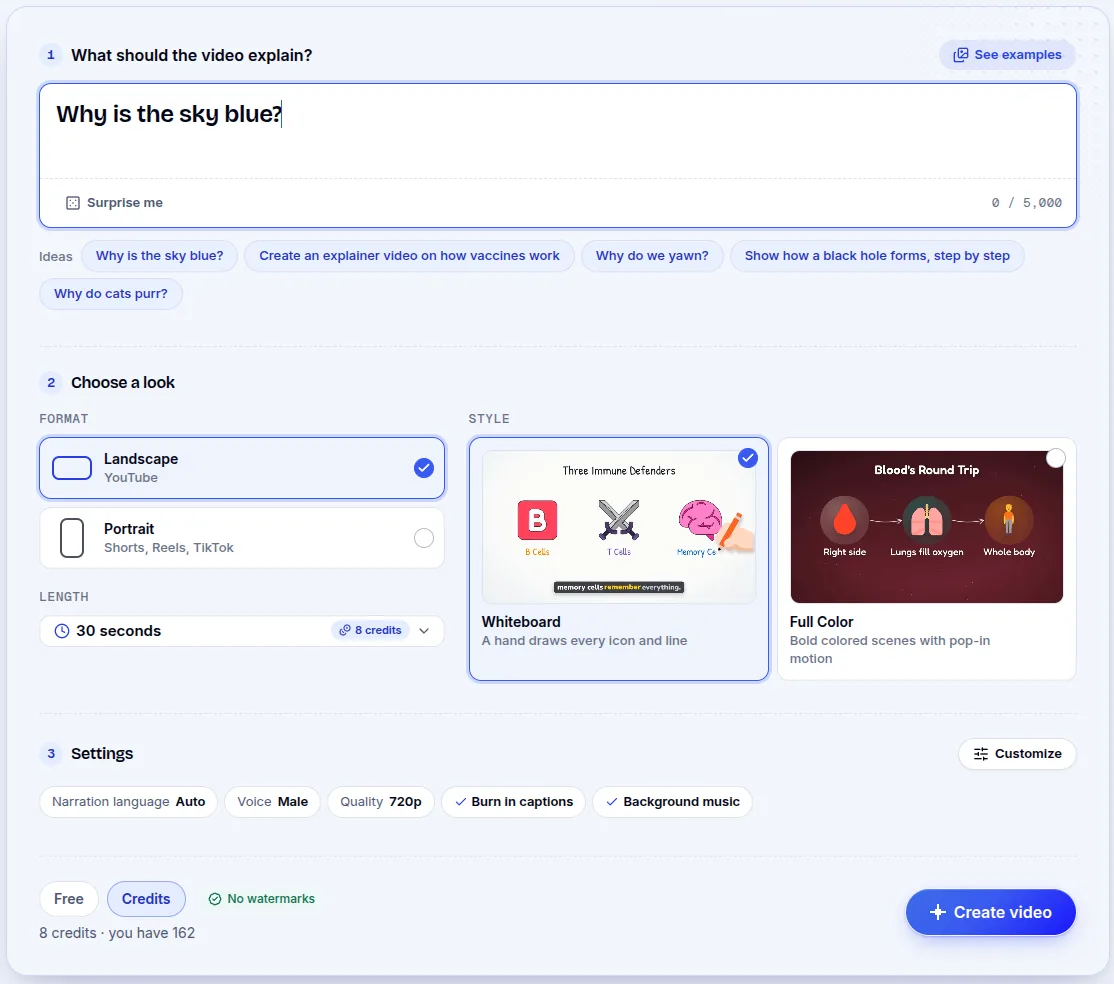
- Write the topic. One clear question works best, for example "How does compound interest grow your savings?". You can also paste your own script if you already wrote one.
- Choose Whiteboard. This style draws every icon and line by hand. Then choose Landscape for YouTube or Portrait for Shorts, Reels, and TikTok.
- Pick the language and the voice. Leave the narration language on Auto and write the topic in the language you want; the video speaks it, from Spanish to Japanese, in 70+ languages. Choose a male or a female voice.
- Pick the length. Free videos run 30 or 60 seconds.
- Tick No watermark. The box shows how many clean videos you have left today. Then press Create video (Free).
- Download. You can close the page while it works; the video is saved in My Gallery. The download holds the MP4, subtitles in an SRT file, a thumbnail image, and YouTube title and description text.
What the clean video looks like
You will not see a logo on the drawings. A short GenPixy screen closes the video after the last scene. The sample below is a 60-second whiteboard video at 720p, the same size a free account gets. It comes from our gallery, so it has a corner mark that your No watermark video will not have.
Topics that fit a short free video
A free video is short, so pick a question with one clear answer:
| Area | Topic to try |
|---|---|
| Science | Why do we see lightning before we hear thunder? |
| Money | What is inflation, and why do prices go up? |
| Health | What does sleep do for your brain? |
| History | Why was the printing press such a big deal? |
| Tech | How does Wi-Fi send data through the air? |
When a subject needs more time, use one question per day and one clean export per day.
When you need more than one clean video a day
A video paid for with a top-up has no watermark and no daily limit. Length runs from 30 seconds to 10 minutes, at up to 1080p. Packs begin at $1.00 with no subscription, and the price appears before you confirm.
Watermark rules for the whiteboard video
Does the No watermark video cost anything?
It costs nothing; it is one of your free videos for the day.
Why can't I tick No watermark?
You already used it today, and the box tells you when it comes back.
Are other free tools watermark-free too?
A few other free tools also leave no mark; our list of free whiteboard animation tools with no watermark compares seven of them.
Start your first whiteboard video. No credit card needed.